
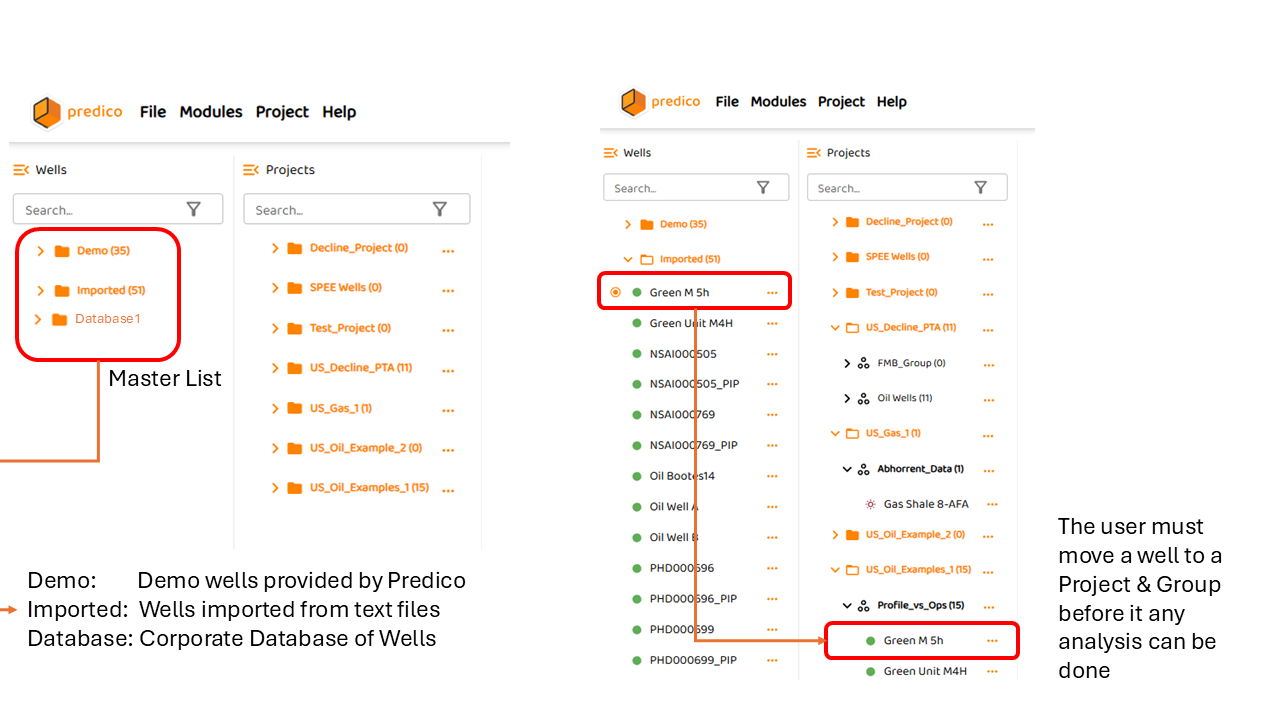
The master lists contains all the wells that the user has access or permissions. All users in your domain will have access to the same list.
These wells must be moved from (dragged by a mouse) to an existing project and group before any analysis can be done.
All types of analyses or simulation, you need to
-
Setup Project Settings.
AFA requires at least 1 Project and 1 Group to perform any analyses or simulation

The master well list is generally composed of 3 or more folders:
-
The “DEMO” folder provided by Predico. If you do not see this folder then this a]was not enabled for your account.
-
The “IMPORTED” folder which contains well imported via a file (see Import Wells )
-
Database Folders which are specific to your corporation
-
When AFA connects to client corporate database to display; it will show a downloading outline icon

-
The user can also find specific wells in either the Wells (Master Well List) or Projects (Project List) using the search capability at Searching the Well & Project List
See Also: